MyChron data analysis on your phone

LapSnap downloads your MyChron 5, MyChron 5S and MyChron 6 sessions straight to your phone over the MyChron's Wi-Fi. Between runs you see every lap on a track map with speed, RPM and your line, and compare laps to find where the time went, without a laptop or Race Studio.
What you see from your MyChron

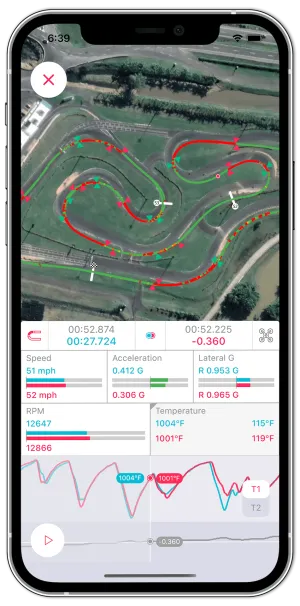
  • Lap times and GPS. Every lap on the track map, with your line through each corner.
  • Speed and lateral g. Where you brake, how much speed you carry through the corner and how hard the kart is cornering.
  • RPM and gear. LapSnap shows RPM and gear when your MyChron logs them.
  • Engine temperatures. The temperatures your MyChron logs, alongside each lap.
LapSnap comparing two MyChron kart laps on a satellite track map, with speed, lateral g, RPM and temperature for each lap
Two laps from a MyChron compared in LapSnap.

Download MyChron sessions to your phone

  1. Check that Wi-Fi is on in the MyChron's settings, and note its Wi-Fi network name and password.
  2. On your phone, open Settings > Wi-Fi and join the MyChron's network. Enter the password if it has one.
  3. Open LapSnap, tap the plus button and choose AiM Device.
  4. Select one or more sessions and tap download.
  5. Choose the track, track condition and vehicle for each session.
  6. Switch to cellular data or another Wi-Fi network so LapSnap can process the session.

A 20-minute session downloads in 10 to 40 seconds, depending on how many channels the MyChron logged. Processing takes a few seconds. If a session still shows Processing, pull down on the session list to refresh it.

Find time on the kart

  • Optimal lap. LapSnap splits each lap into four sectors and adds up your best ones, so you see the time you could reach.
  • Compare laps. Put any lap against your best lap, your optimal lap or another driver's lap. Snap to Position lines both laps up at the same spot on track, and the Δt graph shows where you gain or lose time.
  • Professional reference data. At select tracks, compare your laps against a professional's laps on the same track.
  • Leaderboards and setup notes. Each track has a leaderboard, and you can save tire and gearing settings with each session.

Sessions you have downloaded stay on your phone and work offline, so you can review them in the pits between runs.

Also have an AiM Solo 2? See the AiM Solo 2 guide.

Questions

MyChron 5, MyChron 5S and MyChron 6. LapSnap connects to the MyChron over its Wi-Fi.

No. LapSnap downloads the session from the MyChron straight to your phone, so you can review it in the paddock.

Lap times, GPS position, speed, lateral g, RPM and the engine temperatures your MyChron logs.

Yes. LapSnap shows RPM and gear when your MyChron logs them.

A 20-minute session downloads in 10 to 40 seconds, depending on how many channels the MyChron logged. Processing then takes a few seconds once your phone is back on the internet.

Other devices